Importing/Exporting users
Exporting users
- From the Administration Index, select Users > Listing
- Click the Export button on the bottom of the page
- Click the Run Export button on the bottom of the dialog box
Importing users

Ensure that your document is saved as '.csv'.
- From the Administration Index, select Users > Listing
- Click the Import button on the bottom of the page
- Click [Choose File] in the Data Import dialog box
- Find your csv file and click Open
- Click Close on the Import Complete dialog box
Screenshot tutorial:
Exporting users:
Step 1: Go to Administration Index, select Users > Listing
Step 2: Click the Export button on the bottom of the page
Step 3: Click the Run Export button on the bottom of the dialog box.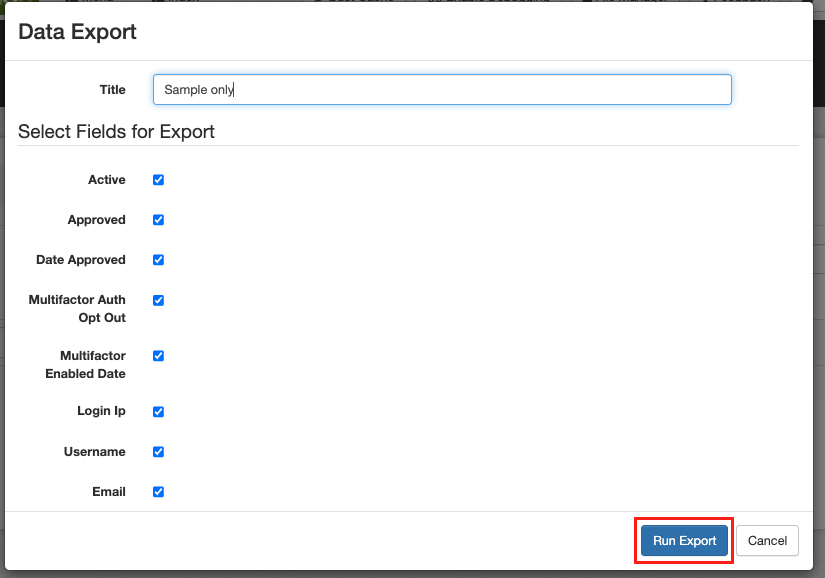
Importing users
Ensure that your document is saved as '.csv'.
Step 1: From the Administration Index, select Users > Listing
Step 2: Click the Import button on the bottom of the page
Step 3: Click [Choose File] in the Data Import dialog box
Step 4: Find your .csv file and click Open
Step 5: Click Close on the Import Complete dialog box
Related Articles
User and customer management
Users are the accounts on your website that allow people to login and use the site. Users are also used for sales people, and administrators. Customers are the synced customer records from your ERP. User management We recommend having your customers ...Abandoned Cart: Add or delete users from the blacklist
Use this article if some of your customers wish to not receive abandoned cart emails. Solution: Customer can be added to a block list, and they will no longer received abandoned cart emails. This will not affect other emails from the site or the ...Manufacturers
Create Manufacturers Exporting Manufacturers From the Administration Index, select Manufacturers > Listing Click the Export button on the bottom of the page Click the Run Export button on the bottom of the dialog box Importing Manufacturers From the ...SEO Metadata
The methods for using SEO Metadata are listed below. Exporting SEO Metadata 1. From the Administration Index, select SEO > Metadata 2. Click the Export button on the bottom of the page 3. Click the Run Export button on the bottom of the dialog box ...Customer Custom Fields
The methods for using Customer Custom Fields are listed below. Exporting Customer Custom Fields 1. From the Administration Index, select Customers > Custom Fields 2. Click the Export button on the bottom of the page 3. Click the Run Export button on ...